A personal planner built on Ikigai and OKRs

Omni Tracker From purpose to daily action

Find your purpose with Ikigai, turn it into objectives and key results, and move forward every day with KPIs and small actions. Omni Tracker keeps the whole chain in one place and shows where you stand.

7-day free trial, then monthly or yearly.

Every account starts with a 7-day free trial of the whole app, including 3 AI analyses, with no payment details. Verify your email and, on Android, Windows and the web, connect Telegram or WhatsApp (optional in the iOS and Mac apps). After the trial, Omni Tracker Pro is monthly or yearly.

  • WebAvailable
  • AndroidComing soon
  • iOSComing soon
  • MacComing soon
  • WindowsComing soon
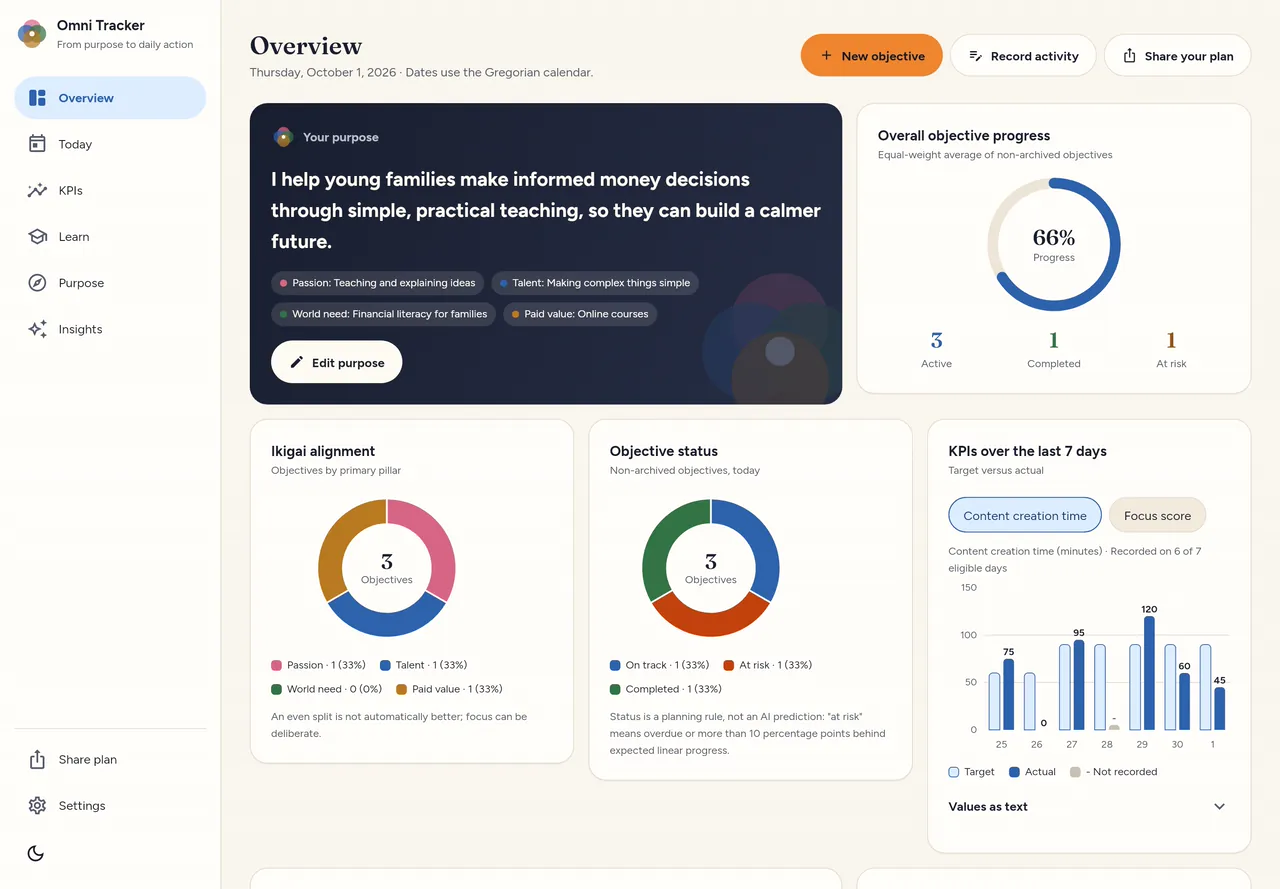
The Overview screen on a desktop in the light theme: the purpose card with the four Ikigai pillars, overall objective progress, the Ikigai alignment and objective status charts, and KPIs over the last 7 days.
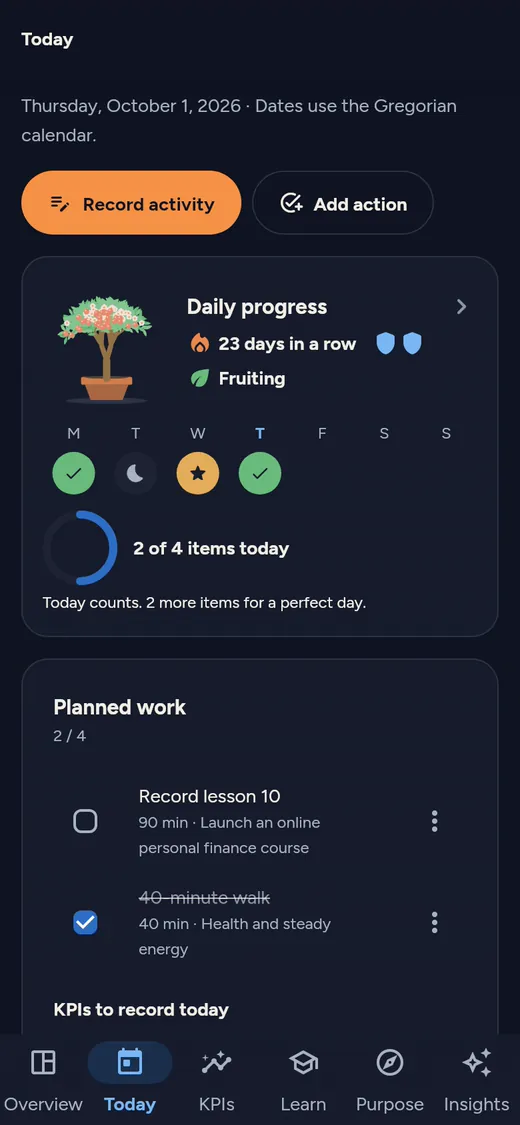
The Today screen on a phone in the dark theme: the Daily progress card with the tree, a 23-day streak and this week’s checks, above the planned work.
Real screens from the app, with a sample plan.

From Ikigai to reflection, in one line

Each layer feeds the next, so what you do today always ties back to something bigger.

  1. Ikigai and purpose

    Fill in the four pillars: Passion, Talent, World need and Paid value. The app drafts a purpose statement from them for you to edit.

  2. Objectives

    Set 90-day, annual or custom objectives, each linked to one of the Ikigai pillars.

  3. Key results

    Give each objective measurable results with a baseline, a current value and a target.

  4. Daily KPIs

    Numbers you record each day, such as practice minutes or pages read, with a daily target and a weekly chart.

  5. Actions

    Planned work for each day on the Today screen: check it off and record the activities you did.

  6. Reflection

    Insights shows a rule-based view of key result progress and a weekly KPI review; “at risk” means overdue or behind schedule.

Features

Daily progress

Checks, streaks and a tree that grows

One small thing is enough for today to count; finish everything planned and it becomes a perfect day with a star. Every 7 counted days earn a shield that keeps your streak alive on a missed day, and you can set rest days.

  • The tree grows with counted days; perfect days and deep practice earn more.
  • It never shrinks or dies. If you skip a few days, its leaves just fade.
  • Yesterday stays open until the end of today, so you can still log what you did.
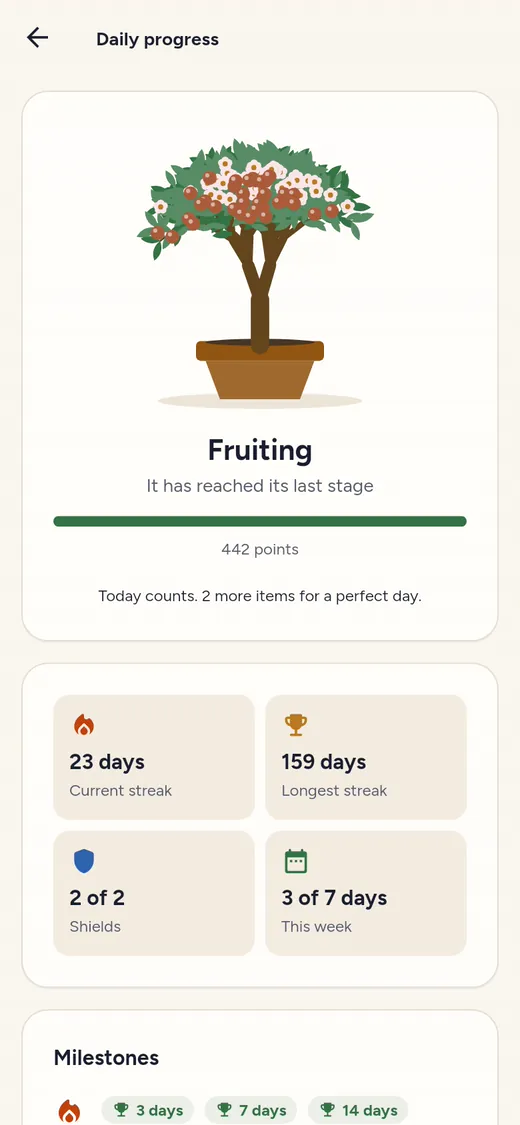
The Daily progress screen in the light theme: the tree at its Fruiting stage, with the current streak, longest streak, shields and this week’s counted days.

Intensive learning

Learn a skill with a clear plan

Create a learning project for each skill: why you are learning it, where you will use it and when you will practice. Everything for that skill lives on one project page, and on your practice days the project also appears on the Today screen.

  • A learning map of concepts, facts and procedures, with the weakest link highlighted.
  • A focus timer and a session log by kind of practice: direct practice, drills, retrieval, feedback and more.
  • Review cards: the ones you know come back at longer intervals.
  • A weekly check-in on nine principles of intensive learning, with a suggestion for the weakest one.
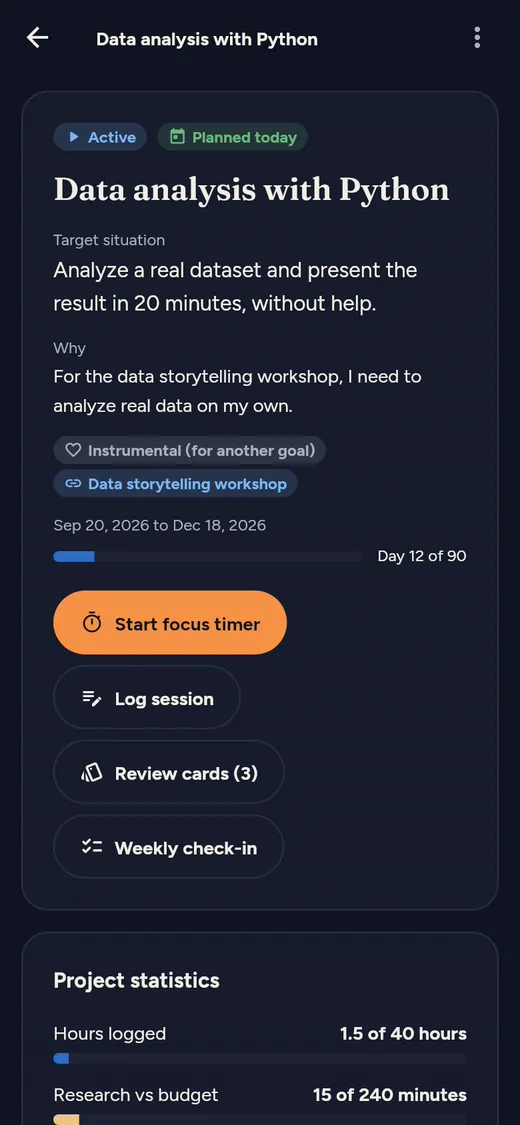
A learning project page in the dark theme: target situation, why, the Start focus timer, Log session and Review cards buttons, and project statistics.

Insights

AI alignment analysis

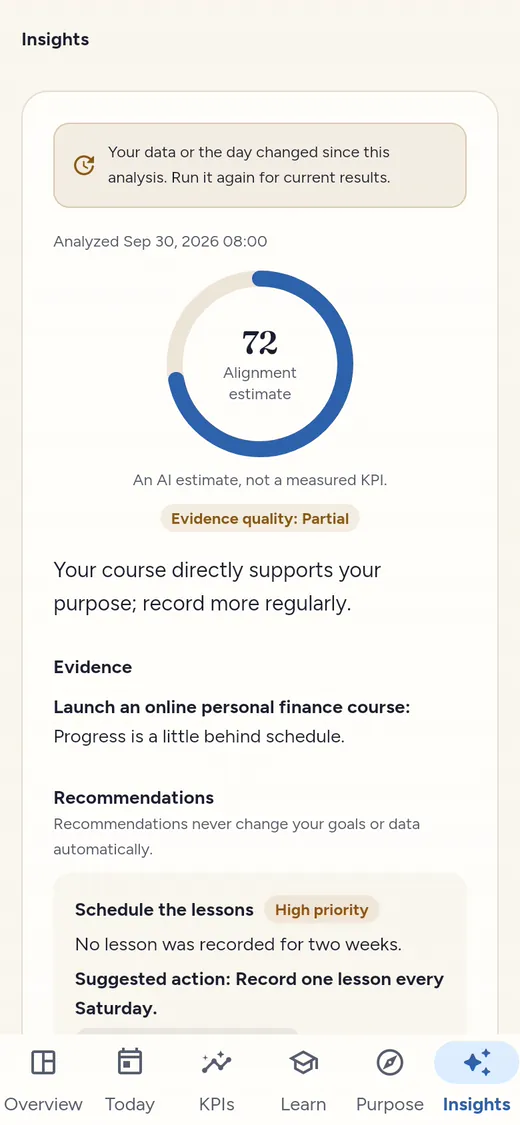
Tap “Analyze alignment” and AI checks how well your objectives, key results and daily KPIs serve your purpose, with evidence and recommendations.

  • Nothing is sent until you tap the button, and journal notes, activity titles, actions and settings are never part of it.
  • The alignment score is an estimate, and recommendations never change your goals or data automatically.
  • Available to Omni Tracker Pro subscribers, and the 7-day free trial includes 3 analyses; Pro is bought on the web with PayPal or crypto, in the Windows app with PayPal, and in the Android, iOS and Mac apps through Google Play or the App Store.
The Insights screen in the light theme: an AI alignment analysis with an estimate of 72, the evidence quality, a summary, evidence and recommendations.

Pricing

Omni Tracker Pro is the whole app, with AI alignment analysis, and has just two plans: monthly and yearly. Every account starts with a 7-day free trial.

7-day free trial

Try everything for 7 days

Create an account and use the whole app for 7 days, including 3 AI analyses. No payment details are needed. After the trial, choose monthly or yearly to keep using Omni Tracker; your data stays. Buying during the trial starts your plan at once; the trial’s remaining days are not added.

Start the free trial

Ways to pay

Use it in your browser today

The web app is the same app, with the same account and sync.

Daily reminders are in the Android, iOS, Mac and Windows apps, not in the web app.